







Hello! I'm your AI assistant. Ask me anything about our knowledge base and I'll help you find the information you need.
Requirements
- Windows 10 or later. ( Might run on Windows 7 but not supported )
- SETX : Open a command prompt and type
setx /?to check. ( Included in windows 10+ as of this date ) - Be a windows Admin user.
- Download and install the latest Bearsampp Prerequisites Package. ( Required )
Download
Download the latest release
View all Bearsampp releases
*See our FAQ for a list of the differences in versions
Modules
Bearsampp offers several versions of the various binaries, applications and tools for download:
Adminer Apache Bruno Composer Ghostscript Git Mailpit MariaDB Memcached MySQL ngrok Node.js Pearl PHP phpMyAdmin phpPgAdmin PostgreSQL Powershell Python Ruby Xlight
Installation
Use a file archiver that supports 7z format like 7zip and extract the archive where you want.
You should not have any white-spaces in the path to Bearsampp as that will cause problems on some modules.
Configuration
Before starting Bearsampp, edit the configuration file Bearsampp.conf :
- lang - Language (see
Bearsampp\core\langsfolder for a complete list). Default :english - timezone - The default timezone used by all date/time functions. Default :
"America/Chicago" - notepad - The editor while opening files. Default :
"notepad.exe" - logsVerbose - Control the log output verbose (0=simple, 1=report, 2=debug, 3=trace). Default :
0 - scriptsTimeout - The default timeout when VBS/Batch are executed. May vary depending on your system. Default :
120
The language, browser & log level can also be changed by right clicking on the  icon and changing them there.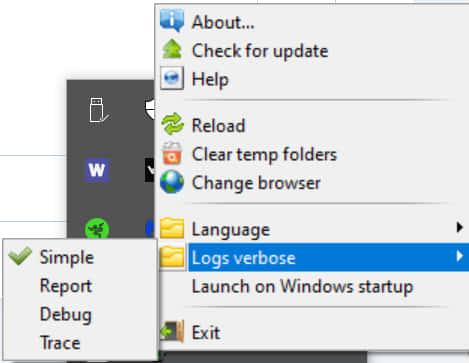
Usage
Launch Bearsampp.exe.
Upgrade
All instructions to upgrade from a previous release are added in the Upgrade notes page.
Typical installation
To install a new version of an application you have to :- Download and install Bearsampp.
- If you already have started Bearsampp, stop it.
- Download a module of your choice (like Apache).
We offer a service called QuickPick that allows you to simply select the module from a dropdown on localhost - Use a file archiver that supports 7z format like 7zip and extract the archive in bearsampp{bin|apps|tools}{name}\ :
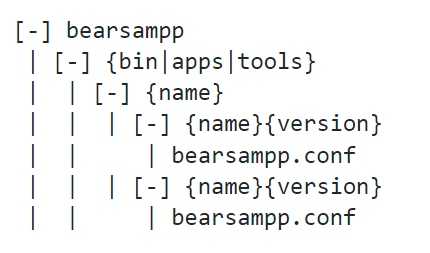
For binaries
- Start Bearsampp
- Switch your binary to the downloaded version (Left click > {name} > Versions)
Otherwise,
- Edit the bearsampp.conf file and replace the key {name}Version with the correct version.
- Start Bearsampp
POSH_ROOT- Path to Oh My Posh installationPOSH_THEMES_PATH- Path to Oh My Posh themes directory
Edit the Set-PSReadLineOption calls in the profile to customize:
- Colors and syntax highlighting
- Key bindings
- History behavior
- Prediction settings
- Edit mode (Windows, Emacs, Vi)
The module includes all Oh My Posh themes. Popular ones include:
- paradox (default)
- agnoster
- powerlevel10k_rainbow
- atomic
- jandedobbeleer
Browse the themes directory or visit https://ohmyposh.dev/docs/themes