




Hello! I'm your AI assistant. Ask me anything about our knowledge base and I'll help you find the information you need.
There are two ways to disable some services to launch on startup.
First you can edit the bearsampp.conf file and change the value to 0 for keys ending with enable = "1" below BINS.
Example: mysqlEnable = "0"
Or you can go to the Bearsampp menu.
Example: Bearsampp tray menu then Mysql then Enable / Disable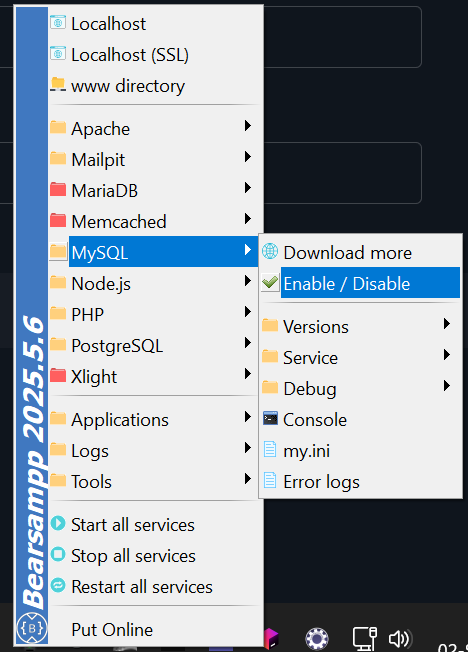
By default MySQL is started on port 3306 and MariaDB on port 3307.
Here is an example using PDO to access a database named wordpress installed on MySQL and MariaDB :
$mysql = new PDO('mysql:host=127.0.0.1;port=3306;dbname=wordpress', 'root', '');
$mysqlStmt = $mysql->query("SELECT * FROM wp_comments");
var_dump($mysqlStmt->fetchAll(PDO::FETCH_ASSOC));

$mariadb = new PDO('mysql:host=127.0.0.1;port=3307;dbname=wordpress', 'root', '');
$mariadbStmt = $mariadb->query("SELECT * FROM wp_comments");
var_dump($mariadbStmt->fetchAll(PDO::FETCH_ASSOC));
The user is postgres and there is no password for this user.
By default, the user is "root" with no password
Bearsampp is a portable application therefore there is nothing to install except the prerequisites package. This provides the various Microsoft code libraries that are used. If you already have them installed, and its possible you already do, they will not be installed again.
For each release there are "Upgrade notes" provided to guide you on how to upgrade.