Download a module of your choice (like Apache). We offer a service called QuickPick that allows you to simply select the module from a dropdown on localhost
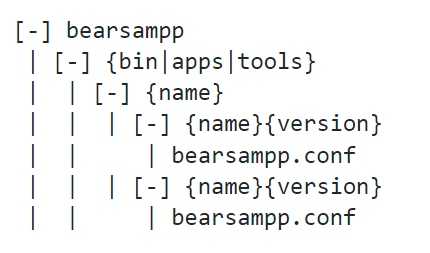
Use a file archiver that supports 7z format like 7zip and extract the archive in bearsampp{bin|apps|tools}{name}\ :
For binaries
Start Bearsampp
Switch your binary to the downloaded version (Left click > {name} > Versions)
Otherwise,
Edit the bearsampp.conf file and replace the key {name}Version with the correct version.
Start Bearsampp
Features
Portable
Bearsampp is a portable application and therefore ideally suited to bring all your development across different computers.
One place to download the latest release and modules for your binaries, tools and applications.
Easily Switch
Easily switch between different versions of your modules.
Effective Homepage
An effective homepage gathering all the information you need is available at http://localhost or https://localhost.
Nice Console
A nice console is available to execute your commands and open the shell you need
Our Supporters
Sorry, this website uses features that your browser doesn't support. Upgrade to a newer version of Firefox, Chrome, Safari, or Edge and you'll be all set.
AI-powered knowledge base assistant. Press Ctrl+/ to open, Escape to close.
Knowledge Base Chat
Hello! I'm your AI assistant. Ask me anything about our knowledge base and I'll help you find the information you need.